Episode Flyer for #51: What Companies Need to Know About Diversity and Technology
Sandy Carter, Vice President of Amazon Web Services, is considered one of the leading pioneers in the digital business revolution. She was formerly the worldwide General Manager of Ecosystem Development and Social Business at IBM. In this episode, Sandy and I discuss how technology can empower women. Discover why diversity matters when it comes to developing technology and what companies need to think about when it comes to creating diverse technology teams.
Episode Flyer for #50: How Brands Can Increase Loyalty and Engagement
Doug and Debra shares their reflections on how brands can maximize their efforts in communicating their stories to customers in order to increase loyalty and engagement. Debra discusses what brands get right and wrong when it comes to speaking to persons with disabilities and takeaways for brands about how they can maximize their efforts.
Episode Flyer for #49 Humanizing Your Brand Through Storytelling
This episode features an interview with Ekaterina Walter, a globally-recognized business and marketing innovator, international speaker, an author of the Wall Street Journal bestseller “Think Like Zuck” and co-author of “The Power of Visual Storytelling”.
Ekaterina discusses the importance of brand storytelling for increased profitability and social impact, and how organizations can humanize their brand through storytelling.
Believe in the old adage that nothing compares to the real thing? How about the virtual real thing? That’s virtual reality (VR), the technological phenomenon of the 21st century. VR allows users to perceive real-life experiences through simulated events and objects. The simulations are controlled by body movements, switches, and levers. By wearing a helmet with a screen inside and glove with sensors, a person can jump into another 3-dimensional world using his own projected image, or avatar.
For persons with disabilities, VR has opened doors to scenarios that they otherwise couldn’t experience. They can do anything from walking in the park to climbing a mountain with real-time sensory feedback. For example, when you climb a virtual mountain, you can sense the height or feel the chill as you climb further up. The only thing that’s removed from the experience is the danger of actually falling.
Since VR is heavily based on visual stimuli, people with hearing loss benefit greatly. According to a study done by Bar-Ilan University in Israel entitled Enhancing Children with Hearing Impairments with Virtual Reality , students with hearing impairments improved on spatial, temporal, narrative, and other cognitive skills. In a VR environment, they could match and assemble items correctly. Purdue University also has developed VR programs that allow colorful, animated characters to teach sign language and math to deaf students who can interact with them.
Yet, many VR environments still don’t have options for sign language or captions. A solution is Sign Aloud gloves that allow persons with hearing impairments to sign in a virtual environment. The sensors in the gloves translate finger and hand movements done for sign language into text and speech. Therefore, someone who’s deaf can communicate with another person who can hear in virtual situations.
https://youtu.be/l01sdzJHCCM
Another barrier in VR environments is audio cues. For instance, a VR tour of the zoo might sound off buzzers when users approach danger zones. If the user is deaf, he would not hear it. A possible solution is vibration feedback. So if you start feeding peanuts to apes in the virtual zoo, you’d get a vibrating warning from the VR glove.
These same advantages and disadvantages that persons with hearing impairments have are exactly the opposite for individuals with vision disabilities. Since VR is saturated with images, persons with vision impairments face major obstacles. Most VR environments are not compatible with screen readers or have audio descriptions to describe the action. However, IBM’s Human Ability and Accessibility Center developed a web-based interface that acts as a screen reader for a VR platform called Second Life, which is a virtual world. Still, 40% of Second City’s objects aren’t labeled correctly for the screen reader to access them. Second Life also provides a virtual guide dog that helps the avatar navigate the environment and make queries.
VR even can make partially blind individuals see clearer. By wearing HTC Vive headsets, they can see images with well-defined outlines and crystal-clear colors. Having every image appear in both lenses centimeters from the person’s eyes allows this technological phenomenon to occur. It lets people with degenerating sight regain their livelihoods. For instance, an architect with maculate degeneration could design again donning the Vive headsets and gloves on a VR desktop.
VR also is opening doors for persons with mobility impairments. By being in VR environments, they can access places and participate in activities that they are otherwise unable to in real life, as mentioned earlier in this article. VR also can help them improve their ability to walk and use their hands without any danger. For instance, a person who had a spinal cord injury can learn how to walk without sidebars in a virtual shopping mall while actually being in a physical therapy office. Consequently, the patient doesn’t have the risk of falling.
Just as in real life, VR environments can present obstacles for persons with mobility impairments. Because most VR headsets gauge head heights, persons in wheelchairs may be unable to interact in a VR environment. Some accommodating headsets exist, however. HTC Vive, for example, has sensors in the headset to determine the head height of the person. While HTC Vive can be ideal for gaming settings, it can’t work for scaled environments in VR. Persons in wheelchairs may view everything like a five-year-old kid looking from a high window and, consequently, can’t interact with virtual objects. For example, suppose the VR environment is a kitchen and the cupboards are too high for people in wheelchairs to reach. Like an actual kitchen, a virtual one also has to be accessible by lowering the cupboards.
Persons with mobility impairments also may have difficulty maneuvering VR inputs like joysticks, knobs, and fine motor control that is required for gestures in VR gloves. If the person can speak, then voice control to interact with the VR environment is the solution. Google Glass introduced the concept with voice control capabilities Referring back to the virtual kitchen example, an individual who can’t move her hands still can cook virtually by issuing such commands as “Put the red pan on the second burner of the stove, and turn the knob to 3.” If the person with dexterity difficulties cannot speak, then eye gaze technology could be utilized. Users could maneuver virtual objects using stares or blinks. For instance, picking up a virtual pan could involve staring at the pan to grab a hold of it, blinking to lift it, moving your head to transport, and blinking again to place it on the stove burner.
VR also can help persons with cognitive disabilities. Specifically, it can prevent individuals with attention deficit hyperactivity disorder (ADHD) from distractions since their senses are contained in the VR environments. It is ideal for studying or taking tests since they can’t see birds flying outside or hear other people talking, for example. Additionally, VR can help persons with Asperger’s Syndrome improve their socialization skills. Interacting with other avatars eliminates stress and intimidation that they encounter with real people. Over time their brains become “re-wired” by the VR interactions that they start acting the same in the real world.
Virtual reality continues to open doors in every aspect of life, from education and training to employment and socialization. As it becomes more prevalent in society, it will help persons with diverse abilities become further integrated or feel more able to do things that they never thought they could do.
Episode Flyer for HPAW: #48 Cutting Ourselves Some Slack
Debra and Doug discuss a recent viral video and the response to it, and the connection to “cutting ourselves some slack.” Debra shares her perspective and advice on how to have more compassion for ourselves and others and what to do when things don’t go as planned.
Episode Flyer for #47: How Strengthening Democracy Helps Unleash Human Potential
This episode features David Carroll, Director of Democracy at the Carter Center, and Avery Davis-Roberts who manages the Center’s Democratic Election Standards Project. David and Avery discuss why strengthening democracy matters, some of the biggest challenges when it comes to building democracy and the connection between democracy and human potential.
In this episode Doug and Debra discuss the importance of taking care of ourselves, tips on how to do that, and the connection to human potential. Discover a simple but powerful exercise for changing your mental state from negative to positive, and also how to notice when you are going into a “flight or fight” response.
Although I’ve been communicating with a manual communication board with letters and words since I was eight, speech therapists have been trying to help me use electronic augmentative assistive communication (AAC) devices. I had never been thrilled with the idea until recently.
Back in the 1980’s, AAC devices had robotic sounding voices that some people couldn’t even understand. The voice made me sound like a teenager from outer space. Now synthesized voices are much more human sounding. Some voices actually would make me sound as I should sound—a sexy woman speaking.
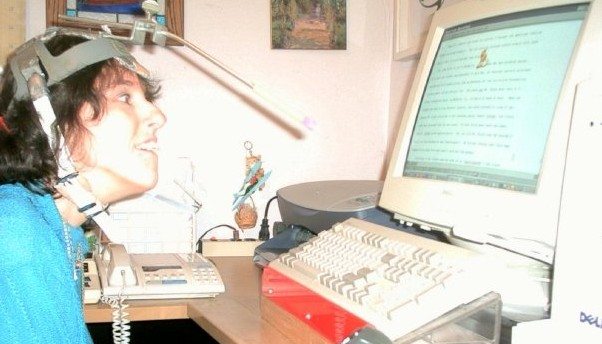
Additionally, since the idea was to use the AAC device away from home, I didn’t (and still don’t) want to use the headpointer out in public for aesthetic reasons (Wearing a helmet with a protruding stick makes me look like I belong in Star Wars!). So, I used my thumb knuckle, which I use to point on my manual communication board, to access buttons on the first AAC device I tried when I was in grade school. When I targeted a single button, I pressed several others with the rest of my hand.
Rosemary Musachio using a head pointer
The idea of AAC devices went on the back burner until I started attending college. Since I didn’t have aides as I did in grade and high school to voice what I pointed to on my manual board, I had to find a way to communicate independently. The Cleveland Hearing and Speech Center set me up with a Light Talker. Each button on the device could be activated with an infrared light. Because I couldn’t hold and manipulate the infrared light pointer, a rehab engineer created an iron-like object that I would drag across the surface and stop at the icon I wanted. Tapping two picture icons were required to say a phrase. For instance, I had to activate the SUN icon and the ELEPHANT icon to say, “I’m happy to meet you.” The Light Talker required users to have photographic minds to memorize all those combinations.
Light Talker
Often the Light Talker stopped working, sometimes in the middle of my forming a sentence. I would look helplessly at my listener until he or she finally understood that the stupid thing died. This would also happen when the plug came out of the pointing device. I used the Light Talker only at school, not at home. Therefore, my manual communication device still was more effective for my personal interactions.
Over the years I’ve tried other AAC devices without avail. I tried scanning where the cursor goes through words or letters. When I wanted to select something, I’d hit a button with my hand so the cursor would stop on an item. Stephen Hawkins uses this method to communicate and operate the computer. Scanning is not for me, however. Either the cursor went too slow that I would forget what I was trying to say in the first place, or it went too fast so I felt like Lucille Ball, working on an assembly line in an “I Love Lucy” episode.
I’ve also tried the eye gaze method. I became excited about it because I assumed it was easy to use. I mean, you stare at an item to activate it through infrared. Well, it isn’t that simple. Your eyes have to be calibrated first. In other words, the device has a camera that takes an image of your iris position so it knows where the infrared light is reflected. If you move your head a lot—as mine usually does–the device continues to recalibrate, causing you not to activate the correct item. Besides not keeping my head steady, I also have one lazy eye that made calibration difficult. Consequently, practicing to use the eye gaze device made me frustrated and tired. Nevertheless, new eye gaze systems have been developed that supposedly improve calibration. I still may try one soon.
Tobii EyeMobile Eye Gaze. Image from www.slashgear.com
Currently, I’m trying the “dot” system on a ChatFusion device. This device still uses infrared. Instead of using my eyes to activate the device, I use an adhesive dot. You can stick the dot anywhere on your body that has the most control and best target position to activate buttons on ChatFusion. I stick it between my eyes since that position allows me to follow the cursor on the screen in relations to my head movement. If I wrinkle my nose, my target range becomes skewed.
Unlike the other devices I’ve used, ChatFusion using the infrared dot has worked so far. Head movements do not have to be calibrated constantly like eye gaze systems. The device can be set according to how much “dwell time” you need to hover over an item to activate it. The device—and it goes with any device—should be positioned correctly so the user can access any item on the screen. For example, if I sit too close, I may not be able to target items at the bottom of the screen well.
Chat Fusion 10. Image from www.Saltillo.com
ChatFusion works better also because I’m investing more practice time. Practicing with someone who I can use the device with to converse engages my attention more than practicing alone. During my practice sessions, I keep telling myself to relax; otherwise, my head becomes one of those bobbing toys in the back of a car. Additionally, I become conscious of how I approach each item with each movement. If I make the cursor slides onto an item from the bottom rather than targeting it in the middle, my head is steadier. The downside is that I may activate other items that I don’t want in the process.
Learning to use an augmentative device takes patience and practice. You need to pace yourself. If you get too tired or frustrated, you need to stop and restart at another time. After 30 minutes using ChatFusion—or any other AAC device—I start losing concentration and my head movements become more random. At this point, I even compose sentences like someone from another planet.
Clearly, my attitude towards electronic AAC devices has changed. Since AAC technology has advanced from 1970’s, I know I will be using a device that will allow me to communicate independently in business and social situations. It may not be Chatfusion; it may be a better eye gaze system or even a brainwave AAC. Once I find the right AAC device and access method, I probably won’t stop talking.
Episode Flyer for EP #45: How Social Media Can Be Used For Social Good
Doug Foresta, producer of Human Potential at Work, joins Debra for a conversation about the benefits of social media, and how social media can be used for great social good. Debra shares why and when she first came online, and the first social media platforms that she used. Discover how to choose the right social media platforms for you, and how to use social media for positive social change.
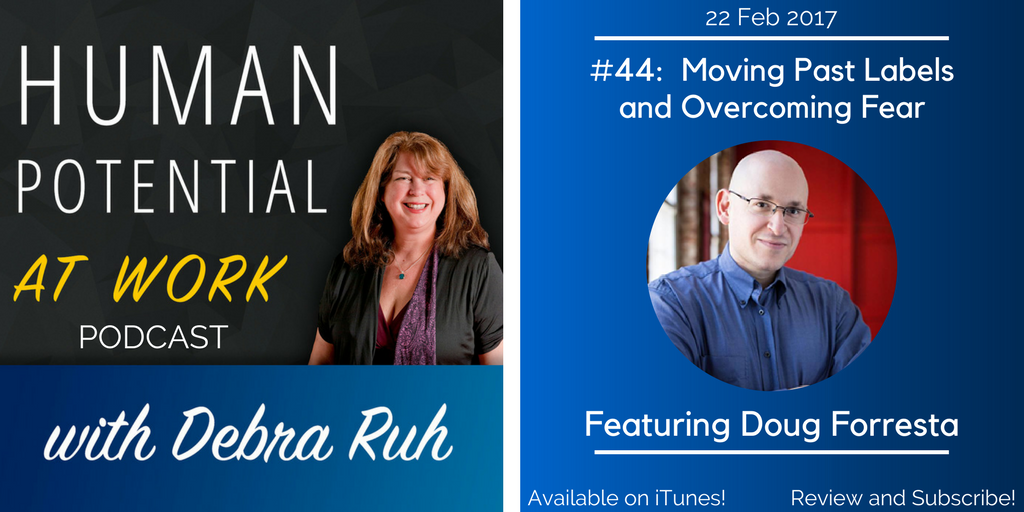
Episode Flyer for EP #44: Moving Past Labels and Overcoming Fear
Debra discusses her recent experiences trying to get counseling for her daughter, Sara, and the lessons about labels and fear. Debra and Doug Foresta (the show’s producer) explore how labels get in the way, and how we begin to overcome fears and limiting beliefs.