By Rosemary Musachio, CPACC, Chief Accessibility Officer
Notice the acronym after my name. CPACC stands for Certified Professional in Accessibility Core Competencies. I recently discovered that I had earned this title after I took the certification exam in January. I’m excited and honored to be among the few so far to be recognized as an expert in the accessibility industry. Currently, around 200 industry professionals have earned their CPACC. The International Association of Accessibility Professionals (IAAP) offers the certification to qualified individuals who have worked in the accessibility industry for several years. CPACC candidates also must be proficient in English.
IAAP: International Association of Accessibility Professionals (Logo)
By being certified in accessibility, something that I’ve been doing for sixteen years, I will be seen as more credible. More people on social media networks, such as LinkedIn, are reaching out to me for advice and input. Not only does that strengthen my self-esteem, it also makes me feel that I’m making a difference in the business and education worlds.
Having a CPACC means companies will know you have fundamental knowledge about disabilities, accessibility and universal design, and laws and standards. With the prestigious credential following your name, business leaders will recognize your commitment to the accessibility field. They seek your advice and insights on accessibility issues regarding technology, architecture, commerce, and transportation. If an employer seeks applicants who have CPACC or require current employees to take it, the company realizes how important accessibility and inclusion are to its success. The certified accessibility professional ensures the office environment and technologies would be accommodating for employees with disabilities. For instance, someone who’s accredited in accessibility would be sure to know that buttons on a kiosk should be in different shapes or sizes for a blind person to use it, than someone who lacks the accreditation.
CPACC’s also are more competent in helping businesses reach out to customers with disabilities. For example, an accessibility accredited web developer ensures that they can use a website without difficulties based on laws and standards such as Americans with Disabilities Act (ADA), Section 508 Refresh, Web Content Accessibility Guidelines 2.0 (WCAG 2.0). Consequently, the certified personnel are expected to know accessibility laws thoroughly so a business would avoid potential litigation.
CPACC also is beneficial because it gives credence to accessibility principles in college courses and job training. Right now 92% of federal websites don’t comply with accessibility standards. This is because many web developers don’t have instructors who were accredited in accessibility. Besides technology, other fields lack accessibility competence in educating their professionals. For instance, if pre-meds and
Young boy holding an iPad at an Assistive Tech Demo, Taken by Raminta Zebrauskas – AMAC Team Photographer
nursing students have courses who are taught by CPACC professors, they would treat patients with accessible attitudes, learning how to communicate better with them. Or if future teachers take courses in universal design for learning, which is part of CPACC, they would know to apply different learning and testing techniques based on students with
diverse abilities.
As more professionals become CPACC certified, persons with disabilities will start noticing the impact. Accessibility in every realm of life will become the norm, not the exception. The employment rate of individuals with disabilities will increase. Commercial and professional services will reap from our patronage. ADA and other disability-based lawsuits will dwindle, being replaced with appeals for more consumers to buy from businesses. Medical professionals who will receive CPACC-based training will communicate with patients with disabilities more effectively, and teachers will understand better the learning dynamics of students with diverse abilities. That’s what being certified in accessibility does.
For more information on becoming a Certified Professional in Accessibility Core Competencies, Please visit the CPACC’s FAQ Page.
Believe in the old adage that nothing compares to the real thing? How about the virtual real thing? That’s virtual reality (VR), the technological phenomenon of the 21st century. VR allows users to perceive real-life experiences through simulated events and objects. The simulations are controlled by body movements, switches, and levers. By wearing a helmet with a screen inside and glove with sensors, a person can jump into another 3-dimensional world using his own projected image, or avatar.
For persons with disabilities, VR has opened doors to scenarios that they otherwise couldn’t experience. They can do anything from walking in the park to climbing a mountain with real-time sensory feedback. For example, when you climb a virtual mountain, you can sense the height or feel the chill as you climb further up. The only thing that’s removed from the experience is the danger of actually falling.
Since VR is heavily based on visual stimuli, people with hearing loss benefit greatly. According to a study done by Bar-Ilan University in Israel entitled Enhancing Children with Hearing Impairments with Virtual Reality , students with hearing impairments improved on spatial, temporal, narrative, and other cognitive skills. In a VR environment, they could match and assemble items correctly. Purdue University also has developed VR programs that allow colorful, animated characters to teach sign language and math to deaf students who can interact with them.
Yet, many VR environments still don’t have options for sign language or captions. A solution is Sign Aloud gloves that allow persons with hearing impairments to sign in a virtual environment. The sensors in the gloves translate finger and hand movements done for sign language into text and speech. Therefore, someone who’s deaf can communicate with another person who can hear in virtual situations.
https://youtu.be/l01sdzJHCCM
Another barrier in VR environments is audio cues. For instance, a VR tour of the zoo might sound off buzzers when users approach danger zones. If the user is deaf, he would not hear it. A possible solution is vibration feedback. So if you start feeding peanuts to apes in the virtual zoo, you’d get a vibrating warning from the VR glove.
These same advantages and disadvantages that persons with hearing impairments have are exactly the opposite for individuals with vision disabilities. Since VR is saturated with images, persons with vision impairments face major obstacles. Most VR environments are not compatible with screen readers or have audio descriptions to describe the action. However, IBM’s Human Ability and Accessibility Center developed a web-based interface that acts as a screen reader for a VR platform called Second Life, which is a virtual world. Still, 40% of Second City’s objects aren’t labeled correctly for the screen reader to access them. Second Life also provides a virtual guide dog that helps the avatar navigate the environment and make queries.
VR even can make partially blind individuals see clearer. By wearing HTC Vive headsets, they can see images with well-defined outlines and crystal-clear colors. Having every image appear in both lenses centimeters from the person’s eyes allows this technological phenomenon to occur. It lets people with degenerating sight regain their livelihoods. For instance, an architect with maculate degeneration could design again donning the Vive headsets and gloves on a VR desktop.
VR also is opening doors for persons with mobility impairments. By being in VR environments, they can access places and participate in activities that they are otherwise unable to in real life, as mentioned earlier in this article. VR also can help them improve their ability to walk and use their hands without any danger. For instance, a person who had a spinal cord injury can learn how to walk without sidebars in a virtual shopping mall while actually being in a physical therapy office. Consequently, the patient doesn’t have the risk of falling.
Just as in real life, VR environments can present obstacles for persons with mobility impairments. Because most VR headsets gauge head heights, persons in wheelchairs may be unable to interact in a VR environment. Some accommodating headsets exist, however. HTC Vive, for example, has sensors in the headset to determine the head height of the person. While HTC Vive can be ideal for gaming settings, it can’t work for scaled environments in VR. Persons in wheelchairs may view everything like a five-year-old kid looking from a high window and, consequently, can’t interact with virtual objects. For example, suppose the VR environment is a kitchen and the cupboards are too high for people in wheelchairs to reach. Like an actual kitchen, a virtual one also has to be accessible by lowering the cupboards.
Persons with mobility impairments also may have difficulty maneuvering VR inputs like joysticks, knobs, and fine motor control that is required for gestures in VR gloves. If the person can speak, then voice control to interact with the VR environment is the solution. Google Glass introduced the concept with voice control capabilities Referring back to the virtual kitchen example, an individual who can’t move her hands still can cook virtually by issuing such commands as “Put the red pan on the second burner of the stove, and turn the knob to 3.” If the person with dexterity difficulties cannot speak, then eye gaze technology could be utilized. Users could maneuver virtual objects using stares or blinks. For instance, picking up a virtual pan could involve staring at the pan to grab a hold of it, blinking to lift it, moving your head to transport, and blinking again to place it on the stove burner.
VR also can help persons with cognitive disabilities. Specifically, it can prevent individuals with attention deficit hyperactivity disorder (ADHD) from distractions since their senses are contained in the VR environments. It is ideal for studying or taking tests since they can’t see birds flying outside or hear other people talking, for example. Additionally, VR can help persons with Asperger’s Syndrome improve their socialization skills. Interacting with other avatars eliminates stress and intimidation that they encounter with real people. Over time their brains become “re-wired” by the VR interactions that they start acting the same in the real world.
Virtual reality continues to open doors in every aspect of life, from education and training to employment and socialization. As it becomes more prevalent in society, it will help persons with diverse abilities become further integrated or feel more able to do things that they never thought they could do.
Although I’ve been communicating with a manual communication board with letters and words since I was eight, speech therapists have been trying to help me use electronic augmentative assistive communication (AAC) devices. I had never been thrilled with the idea until recently.
Back in the 1980’s, AAC devices had robotic sounding voices that some people couldn’t even understand. The voice made me sound like a teenager from outer space. Now synthesized voices are much more human sounding. Some voices actually would make me sound as I should sound—a sexy woman speaking.
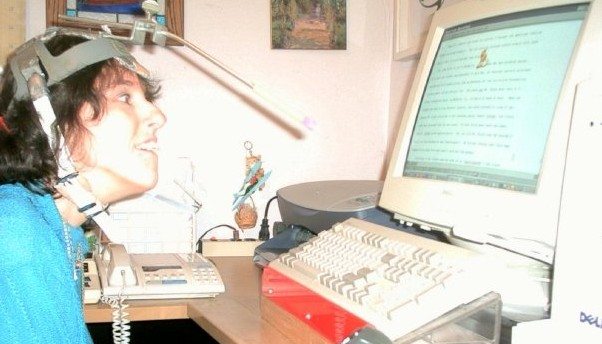
Additionally, since the idea was to use the AAC device away from home, I didn’t (and still don’t) want to use the headpointer out in public for aesthetic reasons (Wearing a helmet with a protruding stick makes me look like I belong in Star Wars!). So, I used my thumb knuckle, which I use to point on my manual communication board, to access buttons on the first AAC device I tried when I was in grade school. When I targeted a single button, I pressed several others with the rest of my hand.
Rosemary Musachio using a head pointer
The idea of AAC devices went on the back burner until I started attending college. Since I didn’t have aides as I did in grade and high school to voice what I pointed to on my manual board, I had to find a way to communicate independently. The Cleveland Hearing and Speech Center set me up with a Light Talker. Each button on the device could be activated with an infrared light. Because I couldn’t hold and manipulate the infrared light pointer, a rehab engineer created an iron-like object that I would drag across the surface and stop at the icon I wanted. Tapping two picture icons were required to say a phrase. For instance, I had to activate the SUN icon and the ELEPHANT icon to say, “I’m happy to meet you.” The Light Talker required users to have photographic minds to memorize all those combinations.
Light Talker
Often the Light Talker stopped working, sometimes in the middle of my forming a sentence. I would look helplessly at my listener until he or she finally understood that the stupid thing died. This would also happen when the plug came out of the pointing device. I used the Light Talker only at school, not at home. Therefore, my manual communication device still was more effective for my personal interactions.
Over the years I’ve tried other AAC devices without avail. I tried scanning where the cursor goes through words or letters. When I wanted to select something, I’d hit a button with my hand so the cursor would stop on an item. Stephen Hawkins uses this method to communicate and operate the computer. Scanning is not for me, however. Either the cursor went too slow that I would forget what I was trying to say in the first place, or it went too fast so I felt like Lucille Ball, working on an assembly line in an “I Love Lucy” episode.
I’ve also tried the eye gaze method. I became excited about it because I assumed it was easy to use. I mean, you stare at an item to activate it through infrared. Well, it isn’t that simple. Your eyes have to be calibrated first. In other words, the device has a camera that takes an image of your iris position so it knows where the infrared light is reflected. If you move your head a lot—as mine usually does–the device continues to recalibrate, causing you not to activate the correct item. Besides not keeping my head steady, I also have one lazy eye that made calibration difficult. Consequently, practicing to use the eye gaze device made me frustrated and tired. Nevertheless, new eye gaze systems have been developed that supposedly improve calibration. I still may try one soon.
Tobii EyeMobile Eye Gaze. Image from www.slashgear.com
Currently, I’m trying the “dot” system on a ChatFusion device. This device still uses infrared. Instead of using my eyes to activate the device, I use an adhesive dot. You can stick the dot anywhere on your body that has the most control and best target position to activate buttons on ChatFusion. I stick it between my eyes since that position allows me to follow the cursor on the screen in relations to my head movement. If I wrinkle my nose, my target range becomes skewed.
Unlike the other devices I’ve used, ChatFusion using the infrared dot has worked so far. Head movements do not have to be calibrated constantly like eye gaze systems. The device can be set according to how much “dwell time” you need to hover over an item to activate it. The device—and it goes with any device—should be positioned correctly so the user can access any item on the screen. For example, if I sit too close, I may not be able to target items at the bottom of the screen well.
Chat Fusion 10. Image from www.Saltillo.com
ChatFusion works better also because I’m investing more practice time. Practicing with someone who I can use the device with to converse engages my attention more than practicing alone. During my practice sessions, I keep telling myself to relax; otherwise, my head becomes one of those bobbing toys in the back of a car. Additionally, I become conscious of how I approach each item with each movement. If I make the cursor slides onto an item from the bottom rather than targeting it in the middle, my head is steadier. The downside is that I may activate other items that I don’t want in the process.
Learning to use an augmentative device takes patience and practice. You need to pace yourself. If you get too tired or frustrated, you need to stop and restart at another time. After 30 minutes using ChatFusion—or any other AAC device—I start losing concentration and my head movements become more random. At this point, I even compose sentences like someone from another planet.
Clearly, my attitude towards electronic AAC devices has changed. Since AAC technology has advanced from 1970’s, I know I will be using a device that will allow me to communicate independently in business and social situations. It may not be Chatfusion; it may be a better eye gaze system or even a brainwave AAC. Once I find the right AAC device and access method, I probably won’t stop talking.
On January 19, 2017, the United States Access Board issued a final rule to make Section 508 Refresh official. The landmark regulatory update will become effective March 20, 2017. Therefore, until the latter date, federally created information and communication technology (ICT) still has to comply with Section 508. Federal agencies and contractors will be required to comply with Section 508 Refresh starting January 18, 2018.
Section 508 Refresh has climbed a bureaucratic mountain. Since its conception in January 2008, Section 508 Refresh has been changed more than a baby’s bottom. It has gone through several updates and delays. To help it remain at its peak, we need to know how to comply with its revised sub-provisions and reap its benefits.
If you wish to examine the new rule, you can read the full text of Section 508 Refresh. Otherwise, Ruh Global Communications’ Chief Accessibility Officer, Rosemary Musachio, will brief us on Section 508 Refresh.
Photo of Rosemary Musachio
Debra: So Rosemary, what will Section 508 Refresh mean for federal entities who are already following the original Section 508?
Rosemary: If your ICT already complies to the original Section 508, you’re off to a great start. In fact, you’re off the hook! Section 508 Refresh has a “Safe Harbor” clause that states if your existing, or “legacy”, ICT already complies with Section 508, then the technology doesn’t have to meet the new provisions. “Legacy” is defined as any ICT product bought, created, or maintained before January 18, 2017.
Debra: What if a legacy product has updates? What should be done then?
Rosemary: For legacy products that have been updated (e.g. webpages) after January 18, they have to meet Section 508 Refresh standards. Similarly, if your legacy ICT doesn’t comply with Section 508, then you would need to abide by the Section 508 Refresh standards, just like all new ICT that’s federally based. “Federally based” used to mean federal departments, agencies, and federal contractors. Yet, Section 508 Refresh has a clause that may broaden that category:
“Public-facing content refers to electronic information and data that a Federal agency makes available directly to the general public.”
So, if a school or hospital, for example, is federally funded and maintains “public facing” content (i.e., websites, Intranets), then the content could be required to be Section 508 Refresh compliant. You should confirm this with your administrator.
Graphic of an alarm clock next to section 508 Clipboard Image from WWW.SITEIMPROVE.COM
Debra:If you’re a federally government entity or contractor who has or will develop products after January 18, 2017, you must comply with Section 508 Refresh by next January also, correct?
Rosemary:Yes, federal government entities who create new ICT have eleven months or so to comply with Section 508 Refresh. Familiarity with the original Section 508 and Worldwide Web Consortium Web Content Accessibility Guidelines 2.0 (WCAG 2.0) will make compliance with the new law easier. Additionally, knowing how Section 508 Refresh affects each ICT category and assistive technology will make compliance a breeze!
Debra: True, Rosemary. Section 508 Refresh includes a broader range of ICT within a more concise set of regulations that should improve the compliance rate and, therefore, accessibility.
Rosemary: When I test products for Section 508 compliance, I have been citing Section 508 1194,22(l) or the software sub-provision 1194.21(a) for keyboard accessibility on websites. Or if there’s a webpage within a software application, I usually had to complete 1194.21 Software and 1194.22 Web for the Voluntary Product Accessibility Template (VPAT), along with 1194.31 Functional Performance.
With technology changing by the day, testing against different set of sub-provisions has been tedious and time-consuming. That’s why Section 508 Refresh covers all ICT categories in a swoop. If a printer has a touchscreen with web capabilities, it has to conform to Chapter 4 Hardware and Chapter 5 Software. Its web capabilities would be covered under the 501 General Provision of Chapter 5:
EXCEPTION: Where Web applications do not have access to platform accessibility services and do not include components that have access to platform accessibility services, they shall not be required to conform to 502 or 503 provided that they conform to Level A and Level AA Success Criteria and Conformance Requirements in WCAG 2.0 (incorporated by reference, see 702.10.1).
By directly referring to WCAG 2.0, Section 508 Refresh will cover web accessibility much more extensively than the original Section 508. With the latter, for example, we had to infer that 1194.22(d) meant that headings, lists, and other content had to be structured correctly. Section 508 Refresh’s reference to WCAG 2.0, however, leads us right to Success Criterion 1.3.1, which specifies what structural markup should be applied. Another example is original Section 508 didn’t mention keyboard trap whereas the Refresh’s reference to WCAG 2.0’s Success Criterion 2.1.2 does. Fourteen other new requirements are included in Section 508 Refresh through WCAG 2.0.
Debra: Besides having clear, more specific requirements to make ICT accessible, Section 508 Refresh also clarifies how ICT should be compatible with assistive technology (AT), which helps persons with disabilities access content. The original Section 508 mentions AT in general.
Rosemary:Ironically, AT itself is exempt from conformance. But yes, Section 508 Refresh does specifies features of AT. For instance, in Chapter 5, it mentions “focus cursor”, which is controlled by screen readers and screen magnifiers. In fact, Chapter 5, section 502 is dedicated to the “Interoperability of Assistive Technology”. It defines how ICT content should behave with screen readers and other devices. Interestingly, sub-provision 1194.21 of the original Section 508 confused many people into thinking that “Software” meant the AT itself. So they weren’t remediating products but providing and remediating AT.
Graphic of Section 508 coming out of a loud speaker Image from: WWW.SITEIMPROVE.COM
Debra: So clarifying that it’s the ICT, not the AT, that must comply with the Section 508 Refresh is definitely a benefit. It will make more products, including websites, more accessible. What other benefits will the Section 508 Refresh offer, Rosemary?
Rosemary:Products procured by the U.S. government also could be sold to foreign governments since the Section 508 Refresh refers to WCAG 2.0, which is considered the international standards. The Refresh also mirrors the European accessibility standard ICT procurement, EN 301 549. This harmonization of the Refresh with international standards also will enable the U.S. government to procure accessible products from other countries.
Another benefit from the Section 508 Refresh is more persons with disabilities will want to work for the federal government since it will have products that are more accessible for them to use. With office technology that is more accessible, productivity for government employees will also increase.
Debra: Besides benefitting federal government employees with disabilities, Section 508 Refresh will make federal government websites more accessible so users with disabilities will have access just like everybody else. Thanks very much, Rosemary, for helping me explain Section 508 Refresh.
Rosemary:My pleasure. Hopefully, we’ve made it easier to understand and to implement.
Several years ago I asked my mom’s gynecologist if she could give me a routine pelvic examination. She said she would have to put me under anesthesia to perform the exam because my cerebral palsy would not allow my body to hold still. Although her reply was cordial, it made me feel demeaned, as if I was a second-class citizen. Couldn’t she have her medical assistant hold my legs while she examined me? In fact, that would have been a reasonable accommodation under the Americans with Disabilities Act (ADA).
This is the kind of treatment that women with disabilities usually face regarding their healthcare. According to the Center for Research on Women with Disabilities (CROWD), we have more difficulty obtaining healthcare than non-disabled women. The National Study of Women with Physical Disabilities supports this, stating that we are less likely to have pelvic exams than women without disabilities.
Besides attitudinal barriers, we also face physical obstacles in doctors’ offices and hospitals. For example, when I get a mammogram, I have to become a contortionist. I have to put one arm upright leaning against the mammography unit, hang on to the bar with the other hand, and rest my uplifted chin against the front of the machine. Include the fact that my body has difficulty keeping still and this almost pain-free routine exam becomes a very uncomfortable feat. Not only am I nervous about the mammogram results, I’m also afraid that I’ll bump my face against the machine. My incidents are not unique. Cases exist where women with disabilities were duct taped to mammography machines. Besides the discomfort, an inaccessible mammography machine may cause unreadable x-ray images, for the patient may move and cause one or both breasts not to be x-rayed correctly. Consequently, potential tumors may be overlooked.
Struggles that women with disabilities face regarding healthcare stems from several reasons. (These reasons also can pertain to men with disabilities.) First, many medical professionals are ignorant of who we really are. Some think we must be asexual. Because we cannot walk or we have muscle spasms, they assume we also cannot use our bodies to love others or procreate. So they think our intimate organs do not need preventative or medical care. Some doctors suggest hysterectomies to eliminate the hassle of menstrual cycles, assuming we don’t have the desire to become mothers. If we get breast cancer, we may not be offered reconstructive surgery because many doctors don’t see us as having female bodies but as having disabled ones.
Lack of training also contributes to healthcare issues for us. Take the GYN incident above. If the doctor knew how to give an exam to a woman with cerebral palsy, she wouldn’t have suggested the anesthesia or refused medical care. Medical professionals should know how to gently stretch a woman’s legs if they are spastic or place a woman with spinal conditions in comfortable positions during an exam. These techniques should be taught in medical school. The patient also could inform the medical professional about ways to make her feel comfortable and relaxed as possible while she is being examined.
Financial issues and logistics are other obstacles that women with disabilities have to overcome to receive proper healthcare. Many women with disabilities are on Medicaid and Medicare, which deters physicians from accepting their cases. CROWD reports that even if women with disabilities have private insurance, many insurance companies may not pay for specific prescriptions, procedures, therapies, or assistive devices. As an example, insurance may not pay for estrogen therapy because it is not considered a medical necessity.
Although Title II and Title III of the ADA require medical facilities to have accessible medical equipment, many still are not complying. It is like a double-edged sword. Hospitals and doctors may not invest in such equipment because patients with disabilities are few, while we don’t go to these facilities because they lack accommodations. An accessible gynecological exam table, for instance, that can be lowered for easy wheelchair transfers costs between $4,000 and $10,000. While this is expensive, it can be offset with tax incentives.
27 million women in this country and 16% of the world’s women have some kind of disability. As populations become older and live longer, many other women will develop debilitating conditions. Medical facilities and professionals need to realize women with disabilities are not in the minority. More importantly, they must know that we are needed as daughters, sisters, friends, wives, mothers, and productive members of society. So proper healthcare is vital to help us continue fulfilling these roles.
Yet, the responsibility of obtaining healthcare also lies with us. We should tell doctors, medical assistants, and nurses how they could assist us in receiving the best care possible. If they refuse to comply, then we should seek legal or other public action to ensure that all women with disabilities get the care that they deserve.
Rosemary Musachio, Chief Accessibility Officer at Ruh Global Communications
I’m a person who holds down a full time job. I also happen to have Cerebral Palsy. I cannot talk, walk, or use my hands to perform daily tasks. Yet, I work from home as Chief Accessibility Officer for Ruh Global Communications. Until recently, my mother has been
Rosemary photographed with her Mother
taking complete care of me. However, because of aging issues, she has become disabled herself and needs help with caring for me.
Fortunately, I applied for Waiver Home Care Services years ago, which now provides us with needed assistance. Nevertheless, Waiver only provides a limited number of hours of care. Consequently, I, an intelligent productive member of society, may be placed in a nursing home. This has been my biggest fear!! That’s why the passage of the Disability Integration Act is urgent, not only for me but also for millions of other Americans with disabilities who have the right to live at home.
Introduced by New York Senator Chuck Schumer in 2015, the Disability Integration Act (DIA) would ensure that persons with disabilities who need long term care assistance have the choice of remaining at home instead of being forced into an institution. The DIA originated from a report by the HELP committee entitled “Separate and Unequal: States Fail to Fulfill the Community Living Promise of the Americans with Disabilities Act” (ADA).
Americans with Disabilities Act logo
According to the report, the ADA must be amended to emphasize that persons with disabilities have a civil right to stay at home to receive personal care services rather than be institutionalized. This right was upheld in Olmstead vs. LC, ruling that states should remove segregation barriers for us and provide opportunities for full integration in the community. Although the DIA won’t amend the ADA, it will create a civil right law to guarantee our independence. Not only would the DIA prevent individuals with disabilities from being placed into nursing homes, it also would ensure that those who reside in nursing homes are protected under the ADA.
Besides guaranteeing independence to adults with disabilities, the DIA also would free loved ones from emotional and financial burden. No longer would they feel guilty about not being able to take care of us and thus compelled to place us in nursing homes. The DIA would not allow state social services to separate us from family members and from the comfort of our homes. Under the DIA, states (Medicaid) and private insurance would pay for home and community-based care.
So why wouldn’t such a positive life-changing law be supported? Many Congress representatives assume it would be another huge entitlement program too costly to maintain. Yet, the average cost of home health care, where an aide would come and take care of an individual, is $29,640 a year. Currently, the average cost of having someone live in a nursing home is $90,000 a year.
DIA Logo
Another argument against the DIA is that nursing home employees would lose their jobs, many nursing homes would close, and the economy would be dented. Granted, nursing homes would see a drastic change once the DIA passes. However, some nursing homes could be transformed into skilled rehab centers where persons who just became disabled could learn to live independently and may get jobs once they are out in the community. Nursing home employees who might be laid off could find positions in the home healthcare industry, where trained professionals truly are needed. Therefore, the economy will get a boost from the DIA instead of a slam.
Currently, the DIA bill sits in the House waiting to be passed. It has a long way to go before it reaches the President. If we write to our Congresspersons emphasizing the importance of the DIA, write blogs about how it will impact society, and help it maintain a constant exposure on social media; the bill would become a cannon ball gaining force as it rolls to the President’s desk. With so much support behind it, it will become law and give us the independence we deserve.
By Rosemary Musachio, Ruh Global Communications, Chief Accessibility Officer
Government departments, federal agencies, and federal contractors still abide by Section 508 of the 1973 Rehabilitation Act, even though the provisions don’t reflect modern technological advancements or are comparable with international standards. In 2010, the U.S. Access Board realized Section 508 needed to be updated to meet the ever changing technological needs of persons with disabilities. The update is officially called Section 508, or ICT (Information and Communication Technology) Refresh.
Six years later the gleam in the Access Board’s eye is becoming reality. It has gone through four delays, more officially known as Notice of Proposed Rulemaking (NPRM), since then due to further comments on emerging technology and comparability with European accessibility laws. On September 14, 2016, the Access Board finally approved the ICT Refresh. No longer will we have to hold our breath that the Access Board may say “Wait, Apple has launched a sonic version of the ipad. We need comments on it.” The Access Board has handed over the ICT Refresh to The U.S Office of Budget Management (OBM) for approval, which hopefully will occur in six months
Since many U.S. companies want their products to comply both with Section 508 and Worldwide Web Accessibility Guidelines 2.0 (WCAG 2.0), the ICT Refresh is comparable, or harmonizes, with the success criteria of WCAG 2.0. In fact, the latest version of the Refresh refers to WCAG 2.0 many times. For instance, in Section E207.2 the following is stated:
“WCAG Conformance: User interface components and content of platforms and applications shall conform to Level A and Level AA Success Criteria and Conformance Requirements specified for web pages in WCAG 2.0..”
Below are two examples of the harmonization.
Provision 502 of Section 508 Refresh
Sub-guidelines and Techniques of WCAG 2.0 Guidelines
5.2.2.4 Label Relationships. The relationship that a component has as a label for another component, or of being labeled by another component, shall be programmatically determinable.
1.3.1 Info and Relationships: Information, structure, and relationships conveyed through presentation can be programmatically determined or are available in text. (Level A)
502.2.2 Row, Column, and Headers. The row and column an object is in, and the headers for the row and column for that component, if it is in a data table that has row or column headers, shall be programmatically determinable.
H51: Using table markup to present tabular information.
502.2.1 Object Information. The object role, state(s), boundary, name, and description shall be programmatically determinable.
4.1.2 Name, Role, Value: For all user interface components (including but not limited to: form elements, links and components generated by scripts), the name and role can be programmatically determined; states, properties, and values that can be set by the user can be programmatically set; and notification of changes to these items is available to user agents, including assistive technologies. (Level A).
Besides harmonizing with the success criteria of WCAG 2.0, which are geared towards web, software, and mobile applications, the Access Board wanted the ICT Refresh to focus on computers, operating systems, televisions, kiosks, and e-books. This would prevent accessibility auditors and IT managers from asking, “Should I apply the Software sub-provisions of 1194.21 or Web Applications 1194.22 to this product?” With emerging technologies, the 1194.31 Functional Performance sub-provisions have been like the miscellaneous file for everything that doesn’t fit one of the other existing Section 508 sub-provisions.
The ICT Refresh isn’t only an update to Section 508; it also revamps Section 225 that covers telecommunication products and services. For instance, whereas the current version of Section 225 only includes TTYs (telecommunication devices), which are becoming extinct, the ICT Refresh also includes guidelines for real-time text (RTT) and relay services through Internet Providers. The ICT Refresh further resolves overlapping issues between Sections 225 and 508, such as Voice over Internet Protocol (VoIP) devices that have web-based interfaces.
When the ICT Refresh finally becomes official, it will have a positive economic impact. E&IT (electronic and information technology) products that are developed in America could be procured overseas even if they were tested for compliance of Section 508 Refresh only and not European guidelines also since the Refresh standards are based on the worldwide guidelines of WCAG 2.0. Consequently, companies will save money and time by testing a product against only one set of standards instead of two. The same concept would apply to overseas companies who sell their E&IT products to America.
Since the ICT Refresh will increase the accessibility and the quality of accessibility for federal-based products and services, more consumers with disabilities will use them successfully. Consequently, profits will rise and legal complaints will decrease. Additionally, productivity of federal employees with disabilities will improve greatly since they would be able to operate computers and printers, for instance, easier and more efficiently.
Ultimately, the positive effects of the ICT Refresh will influence the American business industry to follow suit. Although the Americans with Disabilities Act (ADA) has been the basis of many lawsuits in recent years, the 26-year law still doesn’t include specifications on how technology can be made accessible. The ICT Refresh hopefully will be interwoven in the ADA so technological accessibility can be clearly addressed not only in the government sector but also throughout America’s business sector.
Learn more about our work at www.RuhGlobal.com or follow us on Social Media @rosemusachio, @debraruh and @ruhglobal on most channels.
#AXSChat: Join Debra Ruh, Neil Milliken, and Antonio Santos for a weekly Twitter Chat on Disability Inclusion, ICT Accessibility, Built Environment, CRPD, Empowerment and Employment. Just search the hashtag #AXSChat at 3pmEST and join the conversation. You can learn more about AXSChat at www.AXSChat.com.
I have the opportunity to work with a lot of talented people, many of whom are individuals with disabilities. A person who I’m very proud of is my Chief Accessibility Officer, Rosemary Musachio. Rosemary was born with Cerebral Palsy as a result of the doctor accidentally hitting her head when assisting in birth. Rosemary is many things, including a college graduate, a writer, a poet, and a world renown accessibility engineer and tester. She also has severe disabilities that impact her mobility and speaking skills. Rosemary uses assistive technology and new technology to communicate with the world.
Rosemary Musachio photographed with a horse
I was delighted when Rosemary agreed to be on my podcast, Human Potential at Work. The episode, titled: “Unlocking Our Gifts and Talents”, discusses her many accomplishments as a technologist and disability advocate, despite having a disability. Rosemary also shares her thoughts about how technology will benefit and change the lives of persons with disabilities and what drives her to succeed.
Human Potential at Work Podcast Show Flyer for the Episode Unlocking Our Gifts and Talents Ft. Rosemary Musachio.
Recently, Rosemary and I have discussed Inspirational Porn. Members of the community of persons with disabilities have been blogging and chatting about Inspirational porn. There are advocates who believe that some portrayals of individuals with disabilities being viewed as inspirational, just for living their lives, is insulting and demeaning. Does society tell the stories of persons like Rosemary, who have overcome so many obstacles to thrive in her life and career? Or is society taking advantage of these individuals? I have read many blogs and comments on social media about this issue which inspired me to interview Rosemary about her thoughts on being an Inspirational Porn Star.
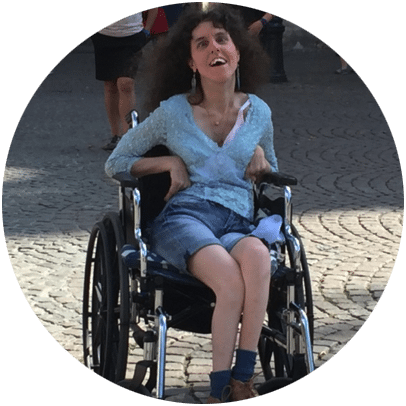
Rosemary photographed at town square in Bruges, Belgium
Debra Ruh’s Interview with Rosemary Musachio
Debra: Rosemary, what do you think about the media telling inspirational stories about individuals with disabilities? Is it Inspirational Porn to you?
Rosemary: Here are my perspectives as an Inspirational Porn Star. My comments will not be X-rated, nor will they be about church officials staring in dirty movies. Instead, the term “inspiration porn” was created by a community who think those without disabilities use the journey’s of persons with disabilities to arouse the spirit or to give them hope.
According to a TEDTalk by Stella Young, she inspires non-disabled person individuals because they can’t see themselves living with disabilities. “I could never do that”, so they are inspired and motivated by those who can. As Young explained, many of us live average lives. We wake up in the morning, go to work, and raise families. Nothing extraordinary about that except that we do it in wheelchairs, without sight, without hearing, or without limbs.
Debra: What do you think about the controversy surrounding Inspirational Porn from Individuals with Disabilities?
Rosemary: We are inspirations because society doesn’t accept us as the social norm yet. So if we do something ordinary- such as work for a living, we’re applauded. Society doesn’t expect us yet to be its productive members. That’s why only 19.8% of American adults with disabilities participate in the workforce force compared to 68.7% of those without disabilities. Not only does Society expect that we cannot work; it also doesn’t anticipate us to be wonderful parents, great athletes, or brilliant scholars. That’s why people become so inspired when they see us performing “great feats” when we’re actually living our lives the best way we can.
Rosemary photographed on a Colorado Dude Ranch
Debra: Do you mind when people say you are an inspiration? I find you very inspiring.
Rosemary: When people say I’m an inspiration to them, my soul radiates. Inspiring other people means I can do something for them. It means my disability has a purpose. God—or whatever higher power— didn’t make me disabled in vain; Call it rationalization or a self-esteem booster. Many people in the disabled community may cringe reading this. They become offended when someone says they’re inspirations for the reasons I described above. While I accept and understand their reaction, I sometimes find refusing people’s admiration arrogant.
Debra: Rosemary, why do some persons with disabilities call these stories inspirational porn? Is it bad to feature and learn from stories of individuals with disabilities?
Rosemary: Maybe confusion arises between being an inspiration and being pitied. The latter means a stranger stopping me in the streets and saying, “I’m sorry this happened to you, I’ll pray for you”, and then putting a cross around my neck (true story). If they really must have prayed for me, I should have asked that they pray I’d win the lottery. What this woman did was show pity. She feels sorry for me because she perceived that I was in a worse condition than she was. I doubt my disability would have a lasting impact on her life.
Instead, inspiring someone does have a positive impact on that person’s life. For example, my high school friend became a special education administrator because I inspired her to help children with disabilities. Another good friend of mine has a lot of pain during the day. Yet, he says when he thinks how I have overcome challenges, it motivates him to wake up in the morning and go to work.
Debra: I understand how we can inspire family and friends. But can we inspire society, businesses, and others?
Rosemary: Yes, I’m proud to be an inspiration to others. However, I don’t want to inspire only my friends. I want to motivate business executives to hire persons with disabilities who are skilled and talented. My disabilities and the way I’ve overcome them must influence others who face the same obstacles to reach goals and realize dreams.
Rosemary Hang Gliding
Debra: Can we continue to inspire without expecting anything else from society?
Rosemary: If some of us refuse to be inspirations, then we may risk pushing social acceptance further away. Nevertheless, while we should accept praise, we also should be vigilant in transforming the admiration and the awe into concrete changes for us. Graciously thank someone when they say to you, “It’s awesome that you work!”. Then add, “You should tweet that companies would benefit from the awesome work we do.”
Debra: Rosemary, thank you for your viewpoint. You have been a teacher and mentor to me since the first day we met. I always value your guidance and wisdom.
Rosemary: Being interviewed by my mentor and friend has been a great honor! I hope we open more minds and hearts.
Learn more about our work at RuhGlobal.com or follow us on Social Media @rosemusachio, @debraruh and @ruhglobal on most channels.
#AXSChat: Join Neil Milliken, Antonio Santos and myself for a weekly Twitter Chat on Disability Inclusion, ICT Accessibility, Built Environment, CRPD, Empowerment and Employment. Just search the hashtag #AXSChat at 3pmEST and join the conversation. You can learn more about AXSChat at www.AXSChat.com.
This article was originally Posted on the Huffington Post
Photograph of Debra and Sara Ruh
My daughter Sara Ruh was born with Down syndrome in 1987. She has worked since she was 16 years old but our reality is that she still needs our financial support. She lives at home and may for the rest of her life. We love having her at home and have built her a space that works for a young woman of 29 years old.
Recently, I interviewed Mary Glanden a Program Specialist for LandAjob. She is an expert with the Ticket To Work Program.
I hope you learn as much as I did about this program that supports persons with disabilities.
Debra: Tell us more about the Ticket to Work Program.
Photograph of Mary Glanden
Mary: If I had a penny for every time someone said, “I can’t live on my disability income,” I’d probably have $8.43. No kidding! The most common thing I hear is that it is hard to live on disability income, however, the biggest fear, and one of the most misunderstood topics, is that I will lose my benefits if I work. I hope through this article, we will be able to dissect the Ticket to Work program and dispel some of the misconceptions about work and its impact on benefits.
Debra: You are right Mary. Many families in the United States including my family are very confused about this program and other social security programs. So what is Ticket to Work?
Mary: The Ticket to Work program (TTW) is a Social Security initiative for individuals with disability who wants to work and move towards economic independence. Anyone ages 18- 64, who receives Social Security Disability Insurance (SSDI) and/or Supplemental Security Income (SSI) benefits because of his or her disability is eligible to participate in the program. The program is voluntary and the services offered are free. The goal of the program is to offer you the support you need to work for the chance of becoming and staying economically independent. By agreeing to participate in the program, you will not be penalized if you do not achieve self-sufficiency, however, you must be willing to make a good faith effort.
Ticket to Work Program Logo
Debra: Thanks for the helpful answer. How does the program work?
Mary: It works in two significant ways. First, it helps you get back to work and second it protects your benefits. Let’s explore both of these topics:
Getting back to work: TTW has contracted many agencies to help you get back to work. These agencies are funded by TTW so their services to you are free! Together they form what TTW calls The Employment Team. (Cue the wind machine and the Avenger’s theme song). First, there is the Vocational Rehabilitation (VR); they’re probably the Captain America of the team in that they are the most well-known. Then there are the lesser well-known Employment Network (EN) and Workforce Employment Network (WF). These 3 Employment Teams help you get back to work. Depending on which stage of employment you are at, each team offers something different so that one will fit your specific needs. For example, if you haven’t been in the workforce for some time, perhaps an agency offering training might be helpful. If you are looking specifically for at-home positions, maybe an agency offering job placement in at-home work might fit your need. If you are already working, an agency offering ongoing employment support and work-reimbursements might be just what you need. And last but not least, there are two special Employment Teams: Work Incentive Planning and Assistance (WIPA) and Protection Advocacy for beneficiaries of Social Security (PABSS). WIPA offers benefits counseling to help you understand how work and earnings impact your benefits, healthcare and other public benefits. They are really the first Team you should talk to when deciding if work is right for you. Finally, there is the PABSS, they are your legal team. They provide the legal support, advocacy and information you need with resolving employment-related concerns. VR, EN, WF, WIPA and PABSS, these 5 types of agencies formyour Employment Team.
Photograph of Mary Glanden
Debra: Mary, another part of this topic includes Work Incentives. That seems to cause a lot of confusion. Can you tell us more about Work Incentives?
Mary: Sure Debra. Work Incentives are the benefits and protections that allow you to keep your cash benefits and healthcare coverage until you achieve self-sufficiency. It allows you to explore work without worry. But different work incentives apply to different benefits. If you are receiving SSDI, your work incentives are vastly different than someone receiving SSI. In order to know which work incentives apply to you, you need to first know the benefits you are receiving. I can’t stress this enough, knowing which benefit you receive is very important! To find out which benefits you receive, please refer to the resources at the end of the article. There are two types of Social Security disability benefits: Social Security Disability Insurance (SSDI) and Supplemental Security Income (SSI). You can receive both SSDI and SSI.
There are several Work Incentives for SSDI, but for brevity sake, we will look at 3:
9 month Trial Work Period
36 months of Extended Period of Eligibility
Expedited Reinstatement
The 9 months Trial Work Period is one of the best work incentives. The 9 months are within a 60 months period (5 years). It is not 9 consecutive months. It is 9 months that could be scattered over a period of 5 years. You use 1 month when you earn Trial Work Level (TWL) $810 in 2016 ($780 2015 and $770 in 2014). You can keep receiving benefits no matter how much you work and earn, even above Substantial Gainful Activity (SGA), until you use up all 9 months.
Debra: Can you give us some examples Mary?
Mary: Sure Debra let’s review the example below.
Example #1:How to calculate TWP
Please contact Mary Glanden or Author for the information in this chart.
For SSDI, income is calculated by pay period (pay beginning and pay ending dates), not paid date (or check date).
After the 9 months Trial Work Period, you enter the 36 months of Extended Period of Eligibility (EPE). For 3 years, for the months your earnings are below SGA $1130 non-blind and $1820 for blind in 2016 ($1090/$1820 2015 and $1070/$1800 2014), you get SSDI. For the months above SGA, you do not get SSDI. During this 3 years, your SSDI benefits are reinstated right away, no application.
Now after your 3 years and 9 months, if you suddenly find yourself unable to work, you can file for Expedited Reinstatement (EXR). You have 60 months (5 years) to use your EXR work incentive. For SSDI, the start date is the first SGA month after the 36th month of EPE. EXR allows you to request to have your benefits reinstated without completing a new application. While Social Security determines your eligibility for reinstatement, you are eligible for temporary benefits up to 6 months (benefits include cash benefits and Medicare and/or Medicaid).
Basically, these 3 work incentives allow SSDI beneficiaries to work and be on the program for 8 years and 9 month. That’s working without worry right?
Now let’s take a look at SSI. SSI is a whole different beast altogether. SSI is extremely complicated and a whole lot of math. The two most important things to know about SSI beneficiaries are Income and Assets.
Debra: Mary, how does a person qualify for SSI?
Mary: To qualify for SSI, your monthly income cannot exceed the Federal Benefit Rate (FBR). The FBR is set by law and is fixed. The FBR for 2016 is $733 per month for individuals. Income can be earned (wages) and unearned (SSDI, pensions, interests, etc.), there’s also deeming (someone else’s income i.e. parent or spouse) and in-kind (shelter or food received free or at reduced cost). There are things not considered as income such as tax refunds, loans spent in the month received, bills paid by 3rd parties directly to the vendor for other than food and shelter, etc. And income can also be considered as assets. Earnings from your job are considered as this month’s income, what is not spent will be counted as next month’s assets. Did I mention SSI is complicated? For more information on SSA’s definition of income, please visit: https://www.ssa.gov/ssi/text-income-ussi.htm.
SSI is a needs-based program, so, in order to qualify for SSI, your assets cannot exceed a certain amount, $2000 for individuals and $3000 for couples (even if only one member is eligible for SSI). An asset is cash or resource that can be converted to cash and used for your support. An asset can be liquid or non-liquid. As with income, there are things not counted as assets by SSA. For more information on SSA’s definition of assets, please visit: https://www.ssa.gov/ssi/text-resources-ussi.htm.
Debra: It seems complicated and I know many parents and individual with disabilities get confused by the math formulas associated with these programs.
Mary: Remember how I said there’s a whole lot of math involved with SSI? Well, here we go: SSA excludes $20 per month of income not from wages (SSDI, pensions, etc.). SSA excludes $65 per month of wages and ½ of wages over $65. Last but not least, income is calculated by pay date (check date). Let’s look at 2 examples:
Example #2:How to calculate unearned income?
Anna receives $520 per month in SSDI, how much will she receive in SSI?
1. $20 is excluded = $520 – $20= $500 ß countable unearned income – SSDI
2. $733 (SSI FBR) – $500 = $233 ß how much SSI she will receive + state supplement.
Example #3:How to calculate work income?
Anna receives $733 (SSI FBR), $520 in SSDI, and decides to take a job paying $885 in gross wages per month, how does work affect her SSI?
4. $885 – $65 ($65 is excluded. $20 if not used on “unearned income” but in Anna’s case, used in SSDI) divided by 2 = $410 ß countable gross monthly income
5. $500 + $410 = $910 ß this $ amount is more than Anna’s SSI FBR ($733), so she is SSI ineligible
6. $885 Anna’s original gross income + $520 (SSDI) = $1405 ß Anna’s total income
Recap:
$20 is excluded from unearned income
$65 is excluded from earned income
Income = gross pay – (minus) exclusions ÷ (divided) by ½
For SSI income is calculated by pay date (check date).
Think all the math is done? Think again, there are more calculations to do. For SSI beneficiaries, the main work incentive is Impairment Related Work Expenses (IRWEs). They are allowable deductions from your earned income. IRWEs can be items or services that enables to you work (ex. Transportation), Impairment related items or services (ex. Personal Care Attendant), things you pay for that is not covered or reimbursed by any other source (ex. Medical equipment). You have to document these costs, so keep your receipts and hopefully you or someone you know is very good at math.
Debra: It seems like you need to be a math major to understand these programs. Can you tell us more about SSI Expedited Reinstatement?
Mary: Of course, SSI beneficiaries are also entitled to Expedited Reinstatement (EXR). For SSI beneficiaries, they also have 60 months (5 years) to file for EXR. The starting date for SSI is 12 months after the first month of financial ineligibility.
Debra: I have heard many people getting confused about SSDI versus SSI? Can you expand on that topic?
Mary: Absolutely Debra and now we are in the home stretch. Some last odds and ends and best practices. If you collect both SSDI and SSI, you need to count your income two different ways: SSDI (pay period) and SSI (pay date), and the $2000 asset rule still applies to your SSI benefits. It is important that you report your income to SSA and make sure you get a receipt. If SSA does not know that you are working, then you could get benefits for months you shouldn’t and end up with an overpayment issue. If SSA isn’t aware of the loss of your job, then you might not receive benefits for the months you are entitled to. It is important to report to SSA anything and everything that might affect your eligibility. It is also important to document and keep copies of everything you provide to SSA. Be educated, be informed, be proactive and be smart.
John Bertram with MA Senator Petruccelli
Debra: Mary, can you give us some resources to help families and individuals understand the programs?
Mary: Sure Debra and I hope you and your readers have gained some insights as to how the Ticket to Work program works and will be able to make an informed decision if work is right for you.
Resources:
It is extremely important to know which benefit you receive so that you know which work incentives apply to you! To find out which benefit you receive is really simple! You can create and use “my Social Security” account on the Social Security website.
To create a new account, you will need: Your Name, Social Security Number, Date of Birth, Home Address and Email Address.
TIP! Avoid calling the 1st and 3rd of the month if possible as that is when Social Security benefits are paid.
The Red Book is another good resource. (The Red Book serves as a general reference source about the employment-related provisions of Social Security Disability Insurance and the Supplemental Security Income Programs for educators, advocates, rehabilitation professionals, and counselors who serve people with disabilities) https://www.ssa.gov/redbook/documents/TheRedBook2016.pdf
Disability 101 – Disability Benefits 101 gives you the tools and information on employment, health coverage and benefits. Currently it is only offered for the following states: Arizona, California, Michigan, Minnesota, Missouri, New Jersey, and Ohio. Kentucky and Hawaii are currently in discussion with World Institute on Disability on the development of DB 101 in their states.
Debra: Mary thanks for taking the time to explain a complicated topic in layman’s terms so we can all understand the program and benefits. How can our audience contact you and your firm?
Mary: I was honored to answer your questions. It is critical that beneficiaries understand their rights and these programs. Here are some emails and numbers from my organization that can help answer more question. It was a pleasure and honor to be working and speaking to you.
TRAILBLAZING 2016 TO TARGET IMPROVING DISABILITY EMPLOYMENT, INCLUSION AND WORKFORCE SUSTAINABILITY DURING ONE-DAY CONFERENCE SEPTEMBER 17, 2016 AT BROWARD CENTER FOR THE PERFORMING ARTS
Jose Velasco, Global Lead at SAP Technologies ‘Autism at Work’ program, speaks for first-time in South Florida as Special Guest Speaker
PEMBROKE PINES, FL, USA August 22, 2016 – Trailblazing 2016 – envisioned by Nelson and Minerva Santiago, co-founders of Picasso Einstein, authorities on entrepreneurial options for individuals with disabilities – is inviting the private sector, tech companies, financial investors and entrepreneurs with disabilities and their families to the table of innovation to discuss the future of disabilities, business and technology leading to economic self-sufficiency. With the support of SAP Technologies and WIX.com, among other leaders in the rising movement to create jobs for people with disabilities, Trailblazing 2016 will take place Saturday, September 17th at the Amaturo Theater at Broward Center for the Performing Arts in downtown Fort Lauderdale.
Marking his South Florida speaking debut, José Velasco, head of SAP’s ‘Autism at Work’ program, is recognized internationally as a leader in business innovation, for the purposes of creating a more inclusive, sustainable and meaningful employment platform for persons on the Autism Spectrum. In 2014, SAP, with guidance and leadership from Jose Velasco, made a groundbreaking commitment to ensure at least 1% of their entire global workforce represented individuals with Autism. “SAP is proud to support Trailblazing 2016 as there is a skill set people on the spectrum are bringing that has business value,” says Mr. Velasco, who also is the father of two autistic children himself. “We’re finding all kinds of skills in all kinds of disciplines.”
-more-
Dr. Michael Alessandri, clinical professor of psychology in the College of Arts and Sciences and Executive Director of the UM-NSU Center for Autism and Related Disabilities (CARD), will serve as master of ceremonies and Special Guest Speaker. He was also awarded a multi-year grant for his proposal, “Awakening the Autism Entrepreneur,” which seeks to help those who are interested in creating businesses that employ people with Autism. Also making a special appearance, Debra Ruh, CEO at Ruh Global Communications and Author of ‘Tapping into Hidden Human Capital: How leading corporations leverage multiple abilities in their workforce’.
Other Keynotes include Shira Galler, Community Outreach Manager for WIX, a leading global web development platform; Dr. Harold “Hackie” Reitman, founder of Different Brains, who is an entrepreneur, philanthropist and children’s activist. Dr. JR Harding, a 2x quadriplegic and International Disability Expert at the Agency for Persons with Disabilities, who has contributed for over 30 years to national, state, and community policy for the independence and self-sufficiency of persons with disabilities.
Trailblazing 2016 is an all inclusive one-day conference including topic presentations on ‘The Benefits of NeuroDiversity in the Workplace,’ ‘The Significance of Job Creation,’ ‘Using Customized Software Platforms to Advance Business,’ ‘How to Start a Business on a Shoe String Budget,’ ‘How Assistive Technologies Breaks Down Barriers,’ and ‘The Quest for Equality.’ There will be presentations by various Entrepreneurs with Disabilities and the newest Tech Inventions to assist people with disabilities.
TICKETS ARE ON-SALE NOW! Tickets are $50 each and include boxed lunch. The conference is from 8:30am – 5pm and attendees are welcome to register starting at 7am. Blazer Exhibitor Booths (people with disabilities running their own businesses) will also be open at this time and at designated times throughout the conference. Individuals with disabilities, their parents, family, caregivers and agency staff; anyone in the private sector, investors or companies creating tech devices helping make people’s life better; anyone interested in learning more about creating businesses to employ adults with disabilities or assisting them to start their own real businesses are encouraged to attend. For more information, buy tickets or register as an exhibitor, please visit www.trailblazing2016.com.
-more-
Stay Connected with Trailblazing 2016
Follow Trailblazing 2016 on Twitter @Trailblazing16. See event news and happenings at #Trailblazing16. Follow Trailblazing 2016 on LinkedIn and like Trailblazing 2016 on Facebook at /Trailblazing16. Download our Sponsor Deck or buy tickets at www.trailblazing2016.com.
ABOUT #TRAILBLAZING16
Trailblazing 2016 is a one-day conference this September 17th at the Amaturo Theater at the Broward Center for the Performing Arts in downtown Fort Lauderdale, FL which focuses on the future of disabilities, business and technology leading to economic self-sufficiency. This conference aims to fuel the progress and innovation needed to improve the state of disability employment, inclusion into the workforce and sustainability across all channels of living. We believe people with disabilities can (and must) participate equally in society by making substantial contributions to economic and social development. Trailblazing 2016 will change the conversation and reveal the future of self-employment as the fastest-growing alternative to traditional employment. For more information or to buy tickets, please visit www.trailblazing2016.com.
ABOUT LEEDD
Part of all proceeds benefit LEEDD, Florida 5019(c)3 Non-Profit Organization, committed to a grassroots approach to educate communities and stakeholders on how self-employment for persons with developmental disabilities (DD) provides an opportunity for persons with DD to participate equally in society and make substantial contributions to economic and social development of our communities.